

Managing application access
1 タスク
5 分
初級
Security
英語
シナリオ
GoGoRoad product managers want to restrict access to development on the New Vendor case type so that only approved roles perform updates. Configure permissions on the New Vendor case type to prevent anyone with the User role from performing any actions on the case type.
The following table provides the credentials you need to complete the challenge:
| Role | User name | Password |
|---|---|---|
| Application Developer | author@gogoroad | pega123! |
| User | user@gogoroad | pega123! |
| Territory Manager | territorymgr@gogoroad | pega123! |
補足: Your practice environment may support the completion of multiple challenges. As a result, the configuration shown in the challenge walkthrough may not match your environment exactly.
チャレンジ ウォークスルー
詳細なタスク
1 Set permissions for the User role in App Studio
- In the Pega Platform™ instance for the challenge, enter the following credentials:
- In the User name field, enter author@gogoroad.
- In the Password field, enter pega123!.
- In the navigation pane of App Studio, click Users > User management to display the personas that are associated with the application.
- Click User to view the authorizations for the User persona.
- In the New Vendor row, click the Configure access icon.
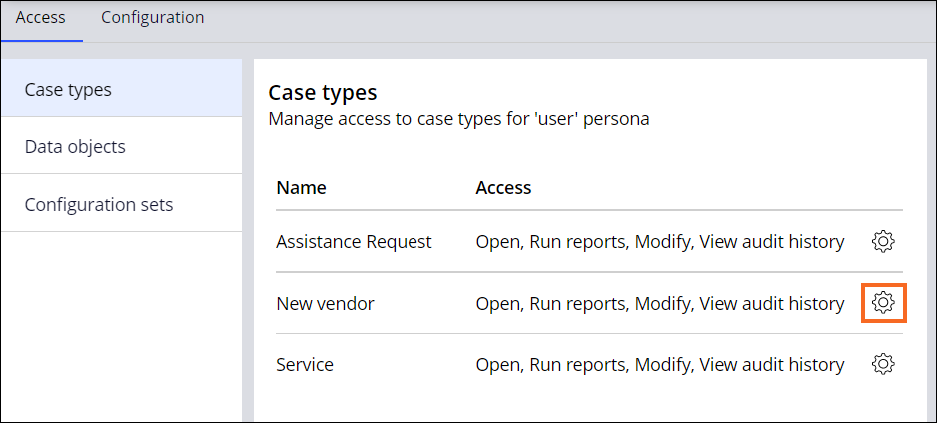
- In the Configure access to 'New vendor' dialog box, clear all the checkboxes, and then click Submit.
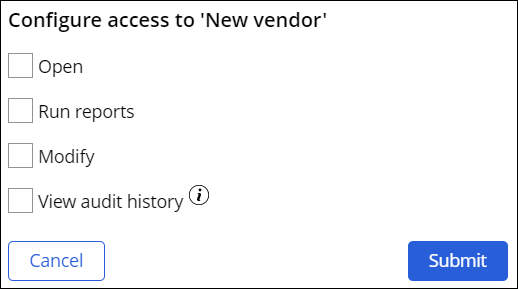
補足: The system automatically saves changes on the Persona access landing page.
トレーニングを実施中に問題が発生した場合は、Pega Academy Support FAQsをご確認ください。