
Updating Assignment routing
2 Aufgaben
10 Min.
Mittel
Case Management
Englisch
Szenario
The Human Resources (HR) department wants the ability to add a new hire to the company payroll. The PegaHR application includes a Case Type to perform this work. A Business Architect has determined that the business process is sufficient for TGB's needs at this time. However, the Process uses a Work Queue that does not match the new organizational structure at TGB. The Human Resources (HR) department has asked that you create a new Work Queue and Work Group to match the organizational new structure at TGB. To do this, make the changes in a copy of the current Complete enrollment Process.
The following table provides the credentials you need to complete the challenge:
| Role | User name | Password |
|---|---|---|
| Senior System Architect | SSA@TGB | pega123! |
Hinweis: This challenge does not have a demo video. Please refer to the Detailed Tasks for step-by-step instructions to complete the challenge.
Genaue Übungsschritte
1 Create the Work Group and Work Queue
- In the Pega instance for the challenge, enter the following credentials:
- In the User name field, enter SSA@TGB.
- In the Password field, enter pega123!.
-
In Dev Studio, create a Work Group with the following details:
Tipp: To create a new Work Group, click Create > Organization > Work Group.Field Value Short description TGB Payroll Work Group name Payroll@TGB Manager Manager@TGB Default Work Queue default@TGB - Create a payroll Work Queue with the following details:
Tipp: To create a new Work Queue, click Create > Organization > Work Queue.
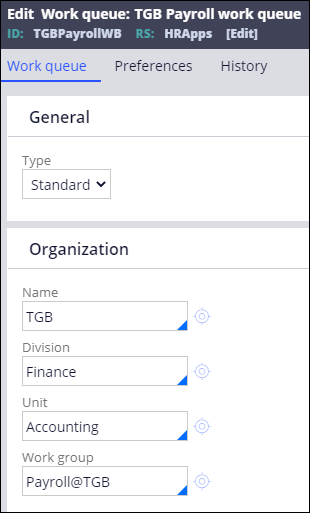
The following figure shows the configuration of the Work Queue:Field Value Short description TGB Payroll Work Queue Work Queue TGBPayrollWB Name TGB Division Finance Unit Accounting Work Group Payroll@TGB
- Save your changes.
2 Update the Assignment to route to the new Work Queue
- In Dev Studio, open the Payroll Setup Case Type to display the Case Life Cycle.
- Select the Review selections Step.
- Configure the contextual menu with the following details:
Field Value Route to Work Queue Work Queue name TGBPayrollWB Set Case Status Pending-Fulfillment
The following figure shows the configuration details of the Review selections Step:
- Save your changes.
In dieser Challenge üben Sie, was Sie im folgenden Modul gelernt haben:
In der folgenden Mission verfügbar:
Wenn Probleme mit den Lerninhalten auftreten, lesen Sie bitte die Pega Academy Support FAQs.
Möchten Sie uns dabei helfen, diesen Inhalt zu verbessern?