
Manipulating application data
2 Tarefas
20 min
Beginner
Data Integration
Constellation
Inglês
Scenario
Stakeholders have requested two features involving Data Transforms. Before a Service Case is resolved, the system must copy the Service total from the Service Case to the parent Assistance Request Case. Also, the Service type field must default to Flat tire to reduce the time spent filling out the average Assistance Request Case.
To assist you, a more senior System Architect used Dev Studio to create the Update services total Data Transform so that the Data Transform can access the parent Assistance Request Case.
Nota: The framework of this challenge uses the Constellation architecture of Pega Platform™.
The following table provides the credentials you need to complete the challenge:
| Role | User name | Password |
|---|---|---|
| Application Developer | author@gogoroad | pega123! |
Nota: Your practice environment may support the completion of multiple challenges. As a result, the configuration shown in the challenge walkthrough may not match your environment exactly.
Challenge Walkthrough
Detailed Tasks
1 Copy Service total to the parent Case
- In the Pega instance for the challenge, enter the following credentials:
- In the User name field, enter author@gogoroad.
- In the Password field, enter pega123!.
- In the navigation pane of App Studio, click Case Types > Service to open the Service Case Type.
- In the Perform service Process, click Step to add a new Step in the Process.
- Click More > Automations > Run Data Transform > Select to add the Run Data Transform Step to the Process.
- In the Run Data Transform Step label field, enter Update service total.
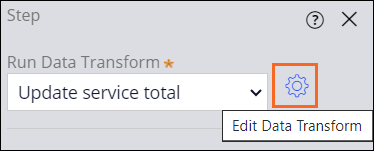
- In the Step properties pane, in the Run Data Transform list, select Update service total.
- Click the icon to edit the Data Transform.
- In the Edit Data Transform dialog box, in the Action list, select Set.
- In the Target field, delete the comment, and then enter pyWorkCover.ServiceTotal.
- In the Source field, enter or select .ServicesTotal.
- Click Save to close the Edit Data Transform dialog box.
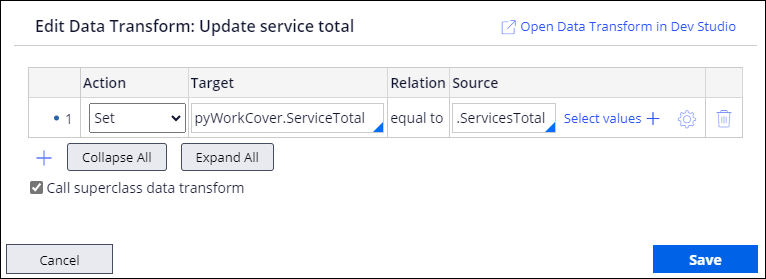 Nota: In this scenario, a more senior System Architect used Dev Studio to add pyWorkCover to the Update services total Data Transform so that the Data Transform can access the parent Assistance Request Case.
 - Click Save to save your changes in the Case Life Cycle.
2 Set default property value for Service type
- In the navigation pane of App Studio, click Case Types > Assistance Request to open the Assistance Request Case Type.
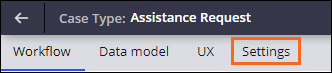
- In the Assistance Request Case Life Cycle, click the Settings tab.
- In the left pane, click Data initialization.
- Click Select field, and then select Service type.
- In the Enter text value field, enter Flat tire.

- Click Save.
Este Desafio serve para praticar o que você aprendeu nos seguintes Módulo:
Disponível nas seguintes missões:
If you are having problems with your training, please review the Pega Academy Support FAQs.
Quer nos ajudar a melhorar esse conteúdo?