

Skipping a process based on business context
1 Aufgabe
10 Min.
Anfänger
Case Management
Englisch
Szenario
Roadside assistance requests are covered for customers who have opted for the higher membership coverage level. Configure the Enter payment information and Invoice customer processes to start when the customer coverage level is not a Gold membership.
The following table provides the credentials you need to complete the challenge.
| Role | User name | Password |
|---|---|---|
| Application Developer | author@gogoroad | pega123! |
Hinweis: Your practice environment may support the completion of multiple challenges. As a result, the configuration shown in the challenge walkthrough may not match your environment exactly.
Challenge-Schritte
Genaue Übungsschritte
1 Add start conditions to the Enter payment information and Invoice customer processes
- In the Pega instance for the challenge, enter the following credentials:
- In the User name field, enter author@gogoroad.
- In the Password field, enter pega123!.
- In the App Studio navigation pane, click Case types > Assistance Request to open the Assistance Request case life cycle.
- In the Create stage, click the Enter payment information process.
- In the contextual properties pane on the right, in the Start process (otherwise skip) list, select Custom condition to display a Gear icon to the right of the drop-down.
- Click the Gear icon to display the Configure condition dialog box.
- In the Configure condition dialog box, in the Field list, select Fields > Customer ID > Coverage level.
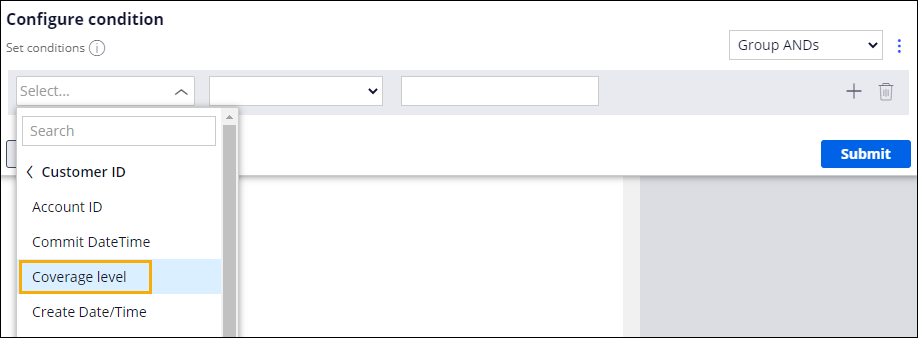 Hinweis: You can search for the Coverage level field using the search field or by clicking Fields > Customer ID to display the list of fields in the Customer data object.
 - In the Comparator list, select is not equal to.
- In the Value field, enter Gold to test whether the customer has selected the Gold coverage level.
- Click Submit to complete the configuration of the condition and return to the case life cycle.

- On the Resolution stage, click the Invoice customer process.
- Repeat steps 3-8 to add a custom condition to the Invoice customer process that starts the process only if the customer has not selected the Gold coverage level.
- Click Save to save the changes to the Assistance Request case life cycle.
In dieser Challenge üben Sie, was Sie im folgenden Modul gelernt haben:
Wenn Probleme mit den Lerninhalten auftreten, lesen Sie bitte die Pega Academy Support FAQs.
Möchten Sie uns dabei helfen, diesen Inhalt zu verbessern?