
Adding optional Actions to a workflow
1 Tarefa
5 min
Beginner
Case Management
Inglês
Scenario
InsCorp wants to ensure that customers can cancel service requests at any time. To support co-production, a system architect configured the Cancel request process for a citizen developer to leverage. Add the pre-configured Cancel request process as a case-wide optional action to cancel assistance requests. Update the process to advance a case to the Cancellation stage if the user elects to cancel their assistance request.
The following table provides the credentials you need to complete the challenge.
| Role | User name | Password |
|---|---|---|
| Application Developer | author@gogoroad | pega123! |
Nota: Your practice environment may support the completion of multiple challenges. As a result, the configuration shown in the challenge walkthrough may not match your environment exactly.
Challenge Walkthrough
Detailed Tasks
1 Add the Cancel request process as a case wide action
- In the Pega instance for the challenge, enter the following credentials:
- In the User name field, enter author@gogoroad.
- In the Password field, enter pega123!.
- In the navigation pane of App Studio, click Case types > Assistance Request to open the Assistance Request case type.
- In the upper right of the Workflow tab, click Optional actions to display existing optional actions.
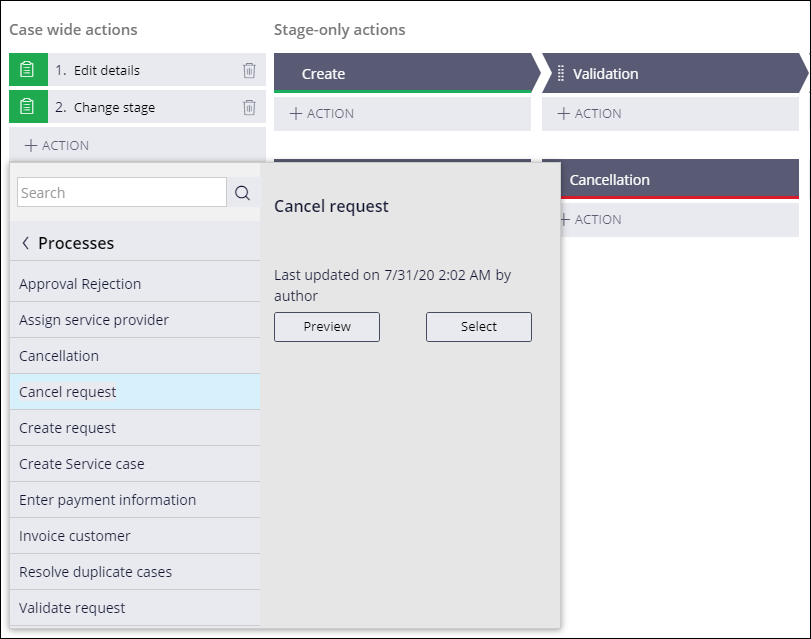
- In the Case wide actions section, click Action > More > Processes to display a list of existing processes.
- From the list of processes, click Cancel request > Select to display the process in the list of case wide actions.
- In the upper right, click Save to apply changes to the Assistance Request case type.
Este Desafio serve para praticar o que você aprendeu nos seguintes Módulo:
If you are having problems with your training, please review the Pega Academy Support FAQs.
Quer nos ajudar a melhorar esse conteúdo?